









Skip to content
Pebbles Ai

Product Marketing

Features for Marketing teams

Research, write, design and publish in your brand voice, with review before anything is reused.

Pebbles Ai mascot beside a phone showing chat messages, a speech bubble above

Feature to problem

Pick a feature, see the problems it solves

Each feature shows the problems it helps solve, who has them and the workflow that solves them, step by step.

Research

Personas, pain points and objections, with numbered citations

Learn more

Problems it helps solve

    • Pipeline is the whole mandateHead of Marketing / Growth, solved with “Revive pipeline from campaigns that went quiet”
    • AI search siphoning away our trafficHead of Marketing / Growth, solved with “Stay visible as AI search changes discovery”
    • Still accountable to a pipeline numberDemand Generation, solved with “Revive pipeline from campaigns that went quiet”
    • Friction with sales over the leads we sendDemand Generation, solved with “Align marketing and sales on one customer”

How Pebbles Ai solves it

Revive pipeline from campaigns that went quiet

  1. Strategy Assistant/diagnose + /identify-trends: find the bet that failed and where demand has moved
  2. Marketing Assistant/research (Persona and Pain Points) built on the trends
  3. Marketing Assistant/leadgen: 100 leads from the trends and personas
  4. Marketing AssistantOutreach: a template for the segment, polished, sent from your Gmail or Outlook
  5. Marketing AssistantOutreach: check which replies are worth answering and answer them; Google Calendar books the meeting; /update-crm logs it
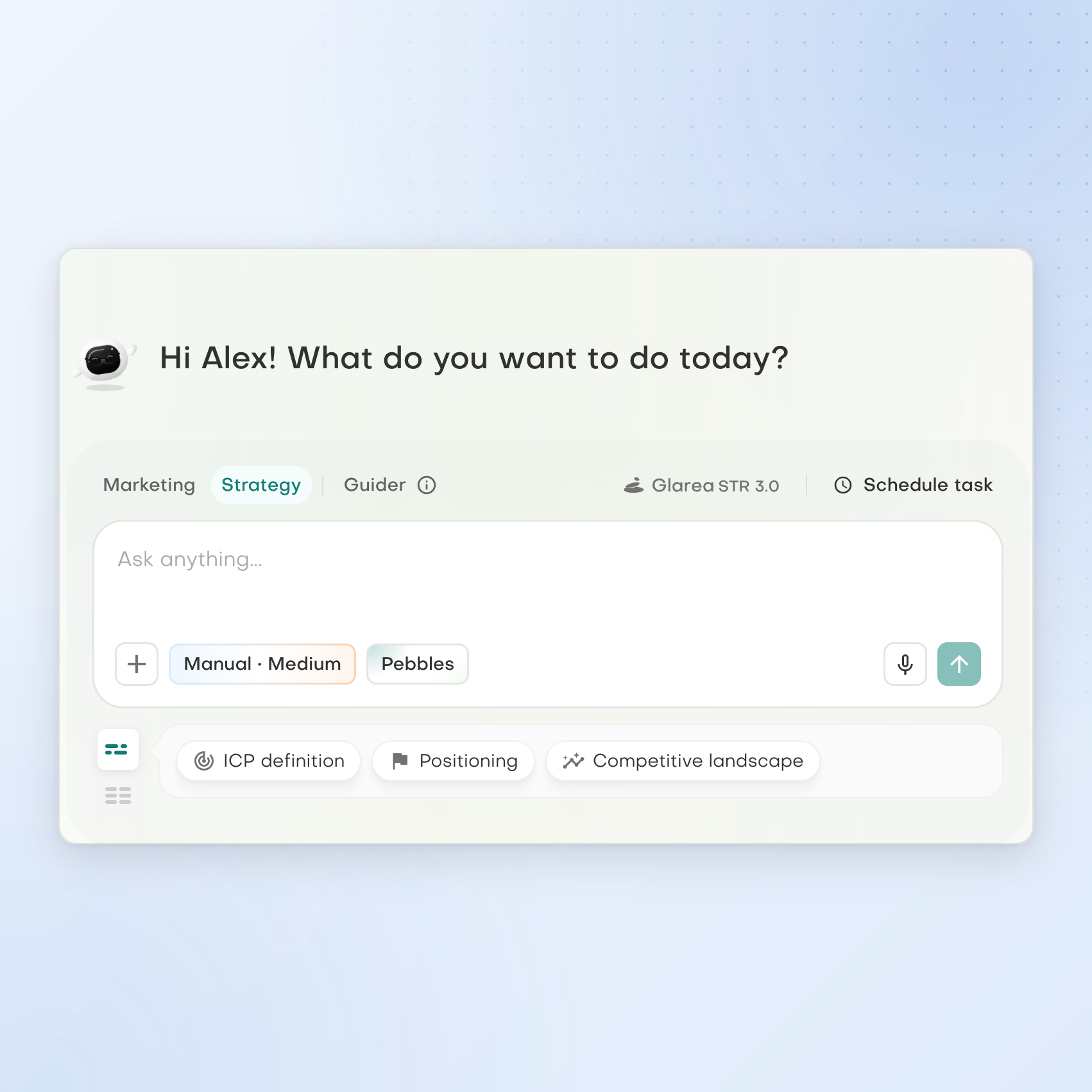
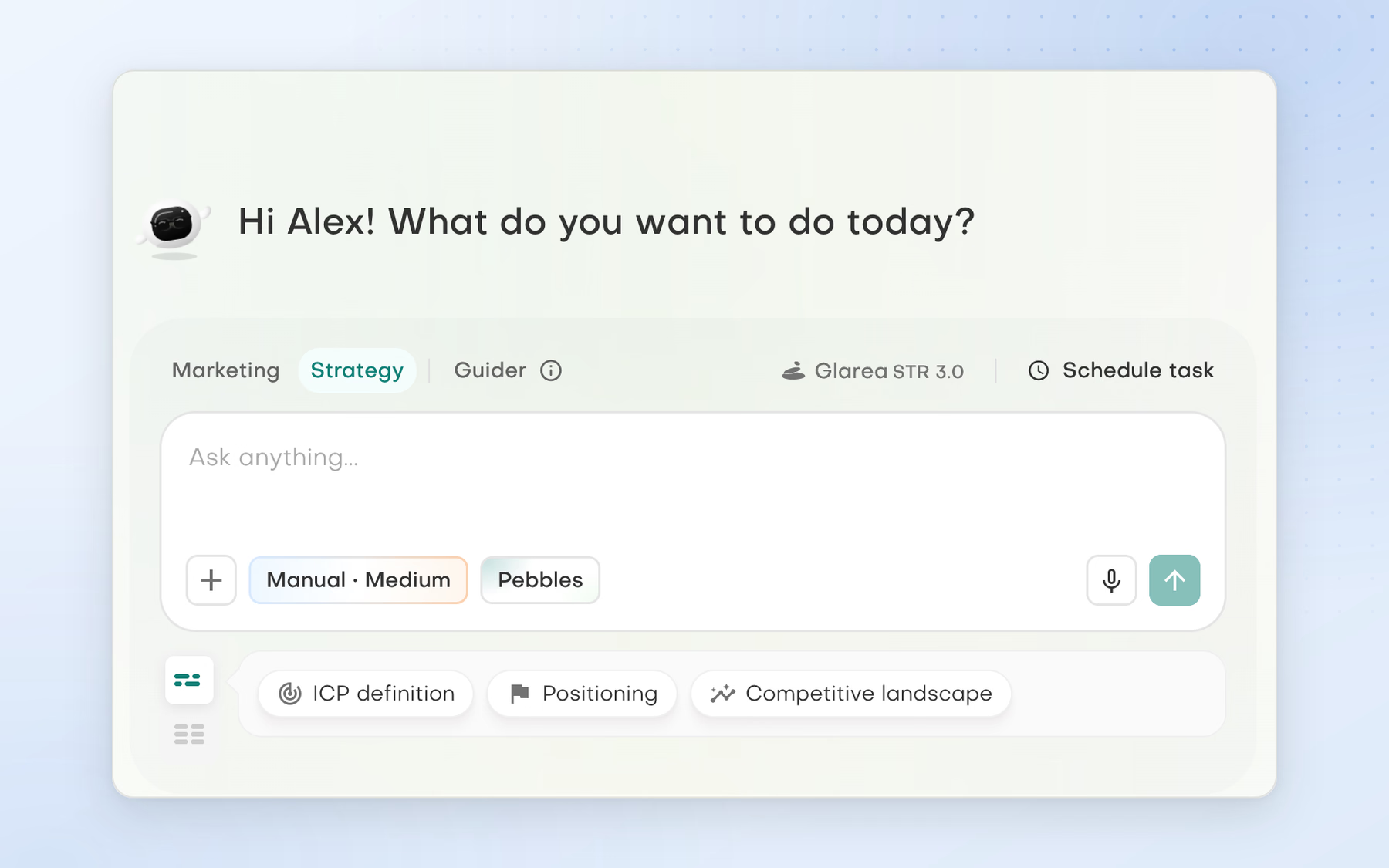
New chat in Pebbles Ai with the Strategy assistant selected, the composer in Manual mode at Medium effort and quick starts for ICP definition, positioning and competitive landscape.New chat with the Strategy assistant selected, the composer in Manual mode at Medium effort and quick starts for ICP definition and positioning.

How Pebbles Ai solves it

Stay visible as AI search changes discovery

  1. Strategy Assistant/identify-trends + /analyse: where buyers and competitors are visible
  2. Marketing Assistant/research: read what public answers cite
  3. Marketing Assistantauthoritative content in your brand voice
  4. Social publishingpublish where buyers and AI answers look
  5. Marketing Assistant/leadgen + Outreach: outbound to replace lost inbound
New chat in Pebbles Ai with the Strategy assistant selected, the composer in Manual mode at Medium effort and quick starts for ICP definition, positioning and competitive landscape.New chat with the Strategy assistant selected, the composer in Manual mode at Medium effort and quick starts for ICP definition and positioning.

How Pebbles Ai solves it

Align marketing and sales on one customer

  1. Company Intel + Company memoryone source of truth
  2. Marketing Assistant/research (Persona and Pain Points): shared ICP and personas
  3. Marketing Assistant/leadgen: leads land in a CRM segment with personalisation angles sales can use
  4. Libraryapproved messaging both teams reuse
  5. IntegrationsSlack and Notion updates posted from the source
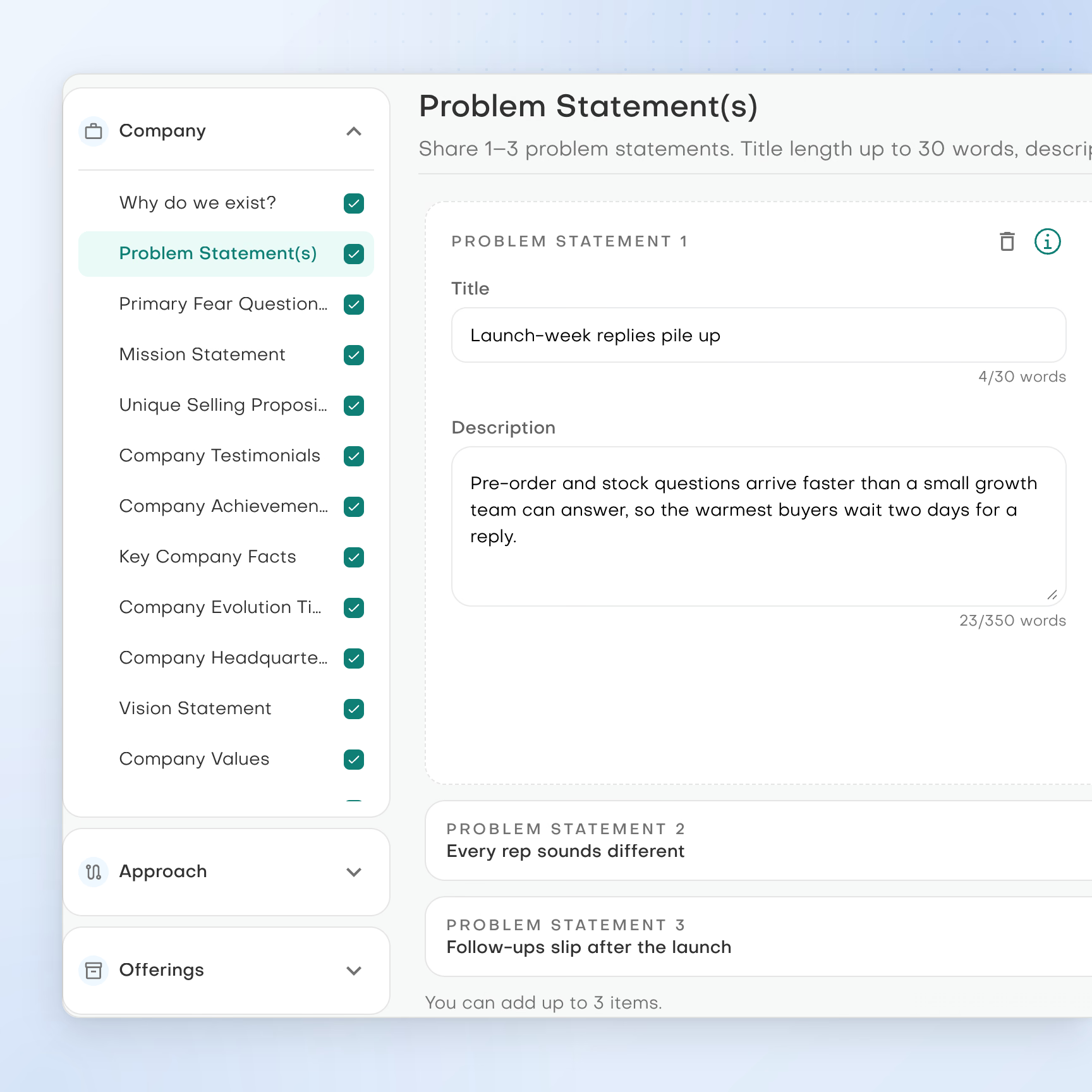
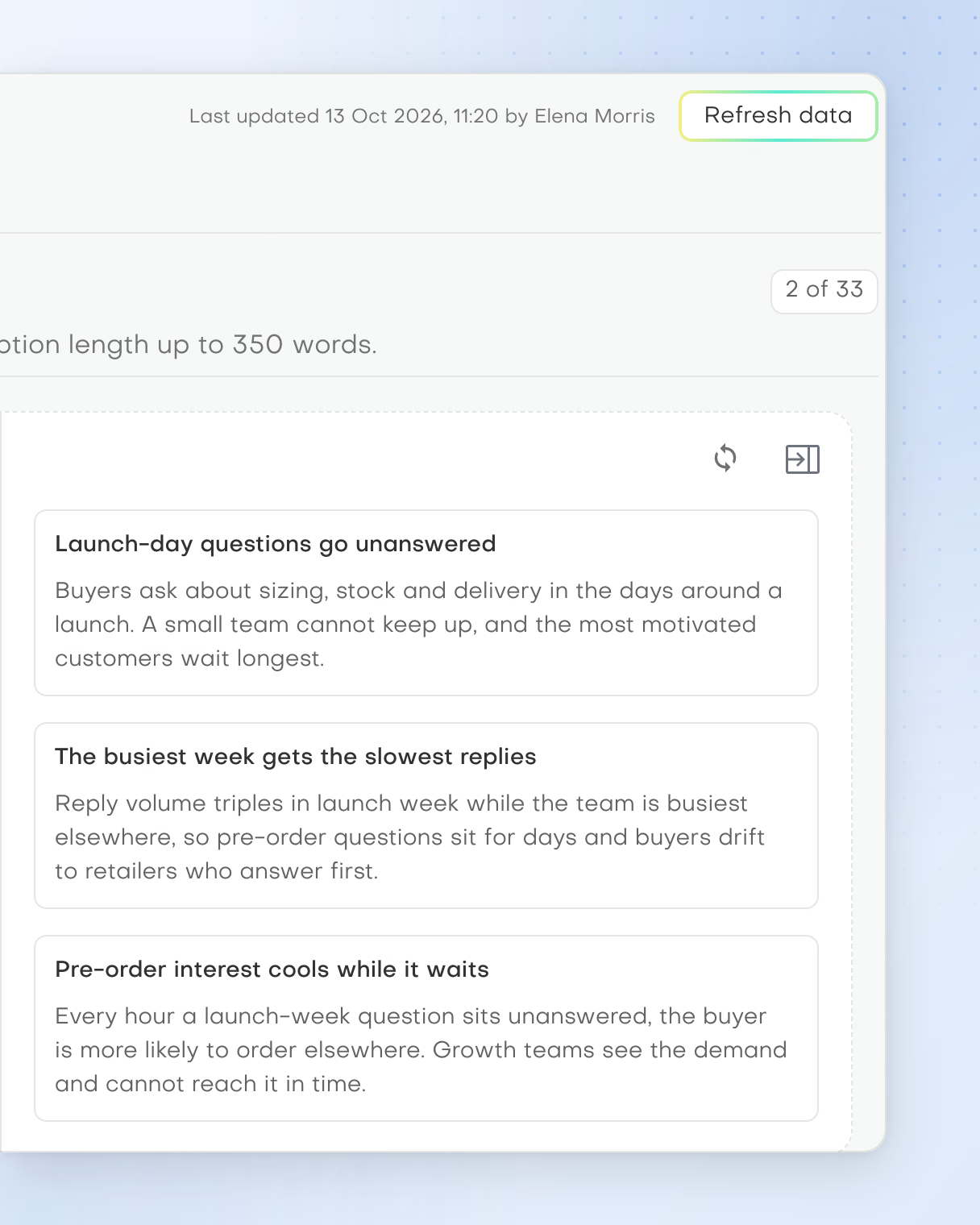
Company Intel's Company checklist, every section ticked and Problem Statement(s) selected, beside the editor for 'Launch-week replies pile up' and the collapsed statements 'Every rep sounds different' and 'Follow-ups slip after the launch'.Three AI-suggested rewrites of a Brightfield problem statement, under a header showing Elena Morris last updated the Company Intel profile at 11:20 on 13 Oct 2026.

Write Now

Posts, campaigns, articles and commercial documents in your brand voice

Problems it helps solve

    • AI search siphoning away our trafficHead of Marketing / Growth, solved with “Stay visible as AI search changes discovery”
    • AI answers replacing visits to our siteDemand Generation, solved with “Stay visible as AI search changes discovery”
    • We ship and forget the launchProduct Marketing Manager, solved with “Launch, then keep it alive”
    • Everything feels so much last minuteProduct Marketing Manager, solved with “Launch, then keep it alive”

How Pebbles Ai solves it

Stay visible as AI search changes discovery

  1. Strategy Assistant/identify-trends + /analyse: where buyers and competitors are visible
  2. Marketing Assistant/research: read what public answers cite
  3. Marketing Assistantauthoritative content in your brand voice
  4. Social publishingpublish where buyers and AI answers look
  5. Marketing Assistant/leadgen + Outreach: outbound to replace lost inbound
New chat in Pebbles Ai with the Strategy assistant selected, the composer in Manual mode at Medium effort and quick starts for ICP definition, positioning and competitive landscape.New chat with the Strategy assistant selected, the composer in Manual mode at Medium effort and quick starts for ICP definition and positioning.

How Pebbles Ai solves it

Launch, then keep it alive

  1. Marketing Assistant/research: competitor and market evidence
  2. Plan boarda launch plan with phases, milestones and dependencies
  3. Marketing Assistantlaunch and follow-up content in your brand voice
  4. Libraryapproved enablement assets for sales
  5. IntegrationsNotion-to-Slack stakeholder updates
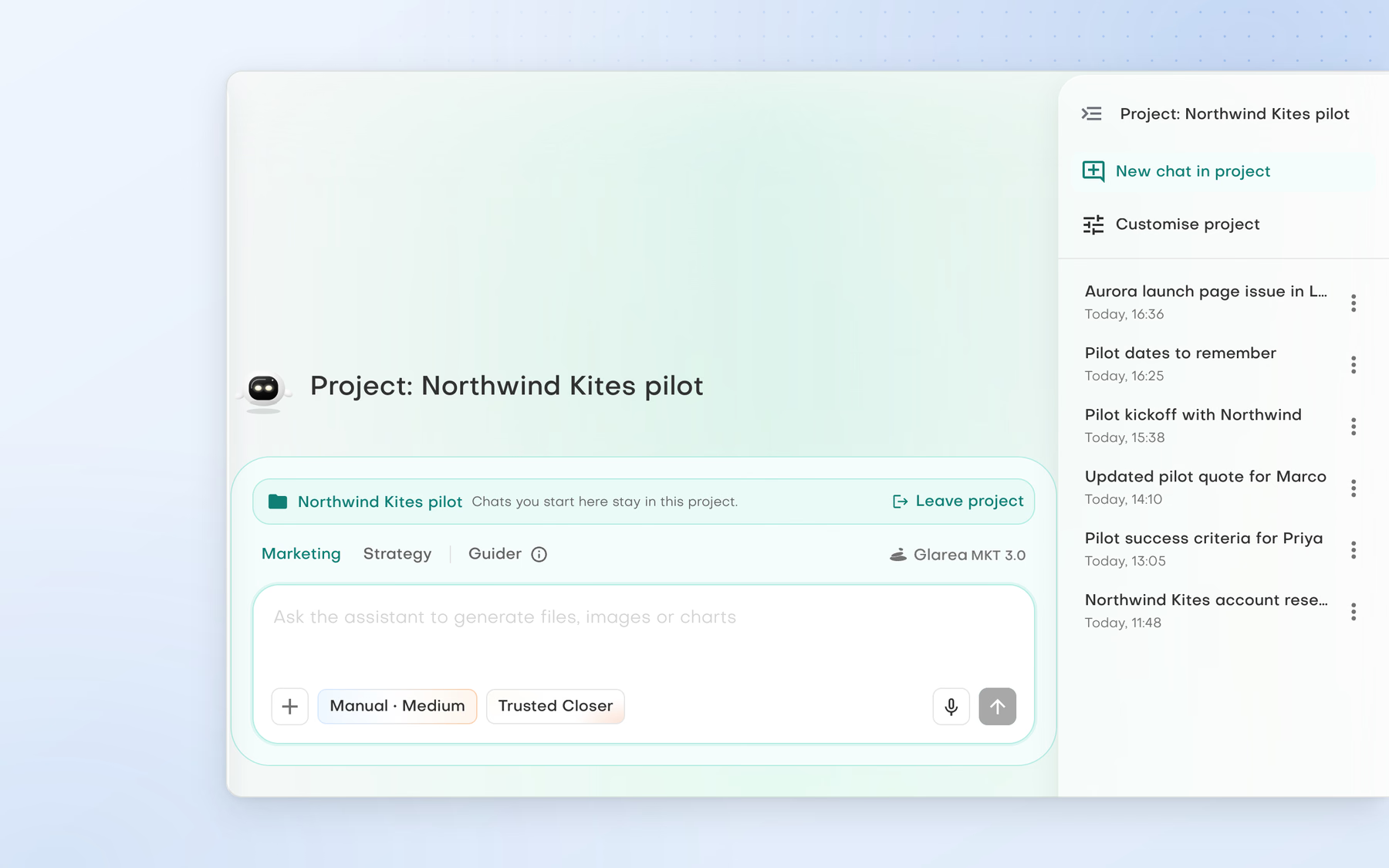
Pebbles Ai project 'Northwind Kites pilot': the composer notes that chats started here stay in the project, and the project panel lists New chat in project above six filed chats, from 'Aurora launch page issue in Linear' to 'Northwind Kites account research'.

Projects keep the work together

File chats under a project. New chats started there stay in it, and the project panel lists every chat filed so far.

Polish Content

Proofread, rewrite or humanise copy to your brand voice

Workflows it runs in

    • Audit your marketing against competitors

Step by step

Audit your marketing against competitors

  1. Marketing Assistant/audit: score your site, assets and performance data
  2. Strategy Assistant/analyse: how competitors position and where they are weak
  3. Marketing Assistant/brainstorm: fixes and campaign ideas from the gaps
  4. Marketing Assistant/polish-up: rewrite the weakest assets in your brand voice
  5. Plan boardthe improvements as phased tasks with owners
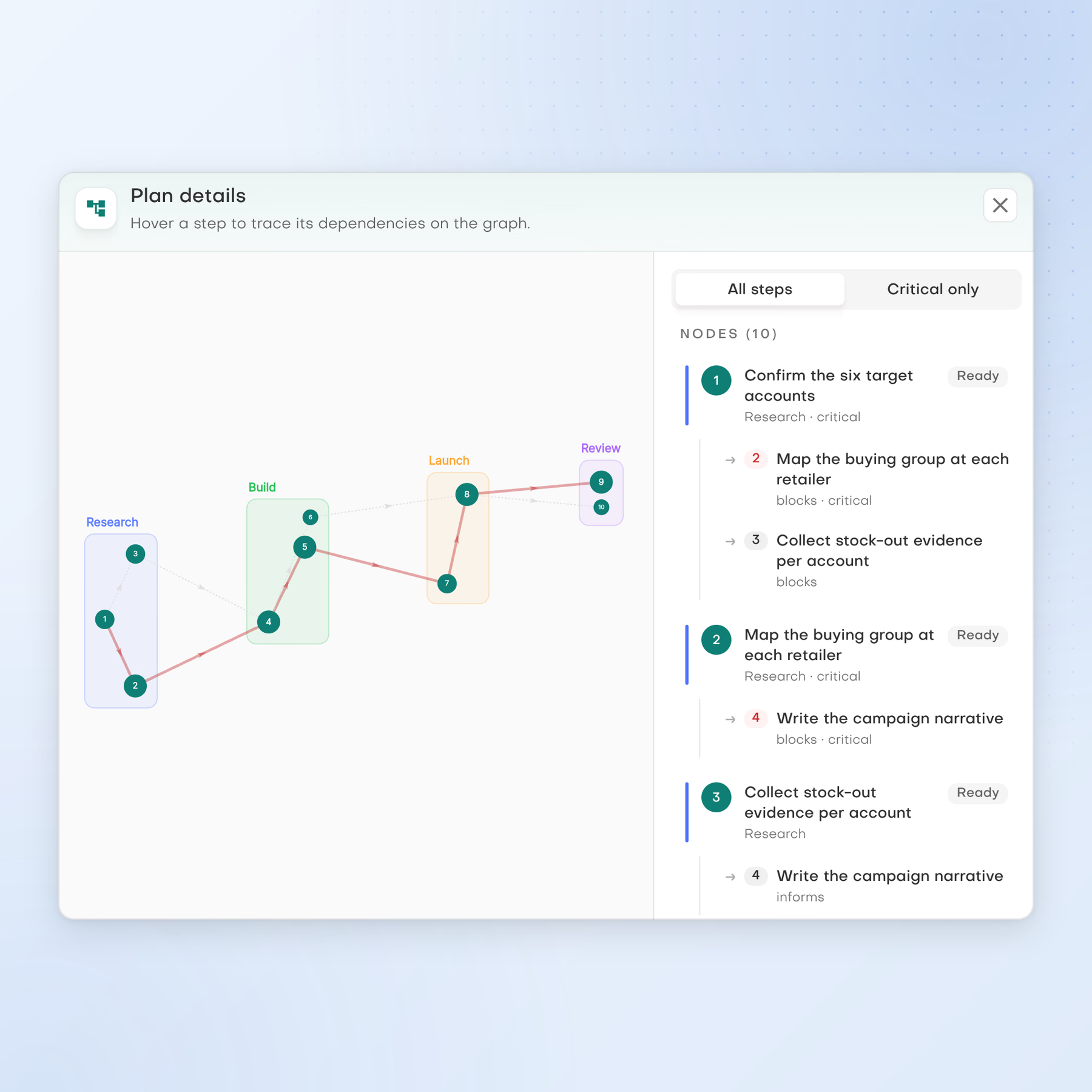
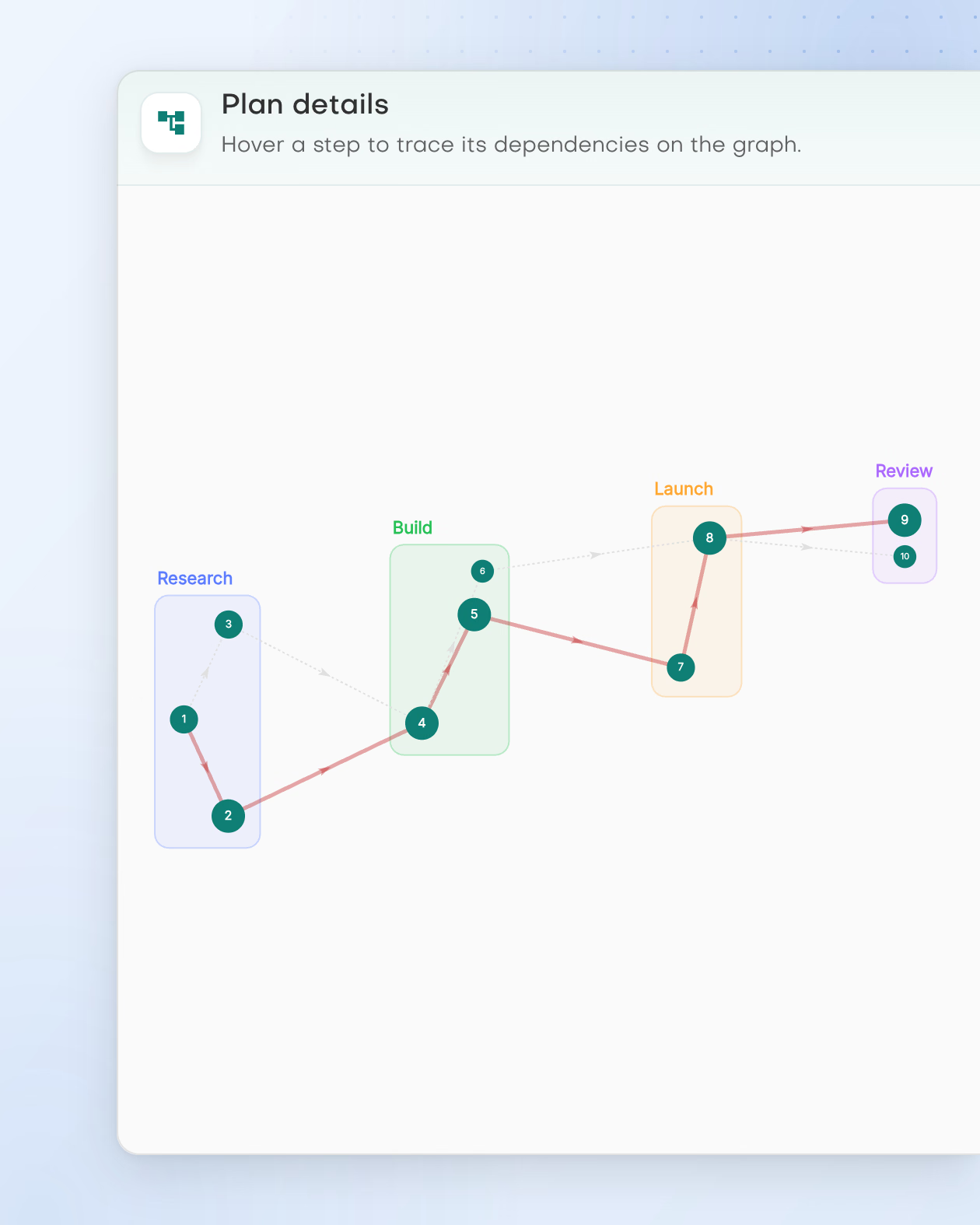
Plan details with the plan's steps drawn as a dependency graph across Research, Build, Launch and Review, beside the list of steps with their status.Plan details with the plan's steps drawn as a dependency graph across Research, Build, Launch and Review.

Visualise

Logos, banners, social tiles, infographics and mockups

Workflows it runs in

    • Plan and publish a month of social content

Step by step

Plan and publish a month of social content

  1. Strategy Assistant/identify-trends: themes worth owning this month
  2. Strategy Assistant/create-assets: a content calendar as a spreadsheet
  3. Marketing Assistantposts in your brand voice with on-brief images
  4. Social publishingschedule the posts
  5. Social publishingperformance reports to adjust next month
New chat in Pebbles Ai with the Strategy assistant selected, the composer in Manual mode at Medium effort and quick starts for ICP definition, positioning and competitive landscape.New chat with the Strategy assistant selected, the composer in Manual mode at Medium effort and quick starts for ICP definition and positioning.

Outreach

First emails and LinkedIn messages written for recipients from your CRM

Learn more

Problems it helps solve

    • Pipeline is the whole mandateHead of Marketing / Growth, solved with “Revive pipeline from campaigns that went quiet”
    • Scrappy budget, every spend questionedHead of Marketing / Growth, solved with “Cut SaaS and AI sprawl”
    • Teams shrinking while resources run shortHead of Marketing / Growth, solved with “Run more channels with the same team”
    • More channels to run, same small teamHead of Marketing / Growth, solved with “Run more channels with the same team”

How Pebbles Ai solves it

Revive pipeline from campaigns that went quiet

  1. Strategy Assistant/diagnose + /identify-trends: find the bet that failed and where demand has moved
  2. Marketing Assistant/research (Persona and Pain Points) built on the trends
  3. Marketing Assistant/leadgen: 100 leads from the trends and personas
  4. Marketing AssistantOutreach: a template for the segment, polished, sent from your Gmail or Outlook
  5. Marketing AssistantOutreach: check which replies are worth answering and answer them; Google Calendar books the meeting; /update-crm logs it
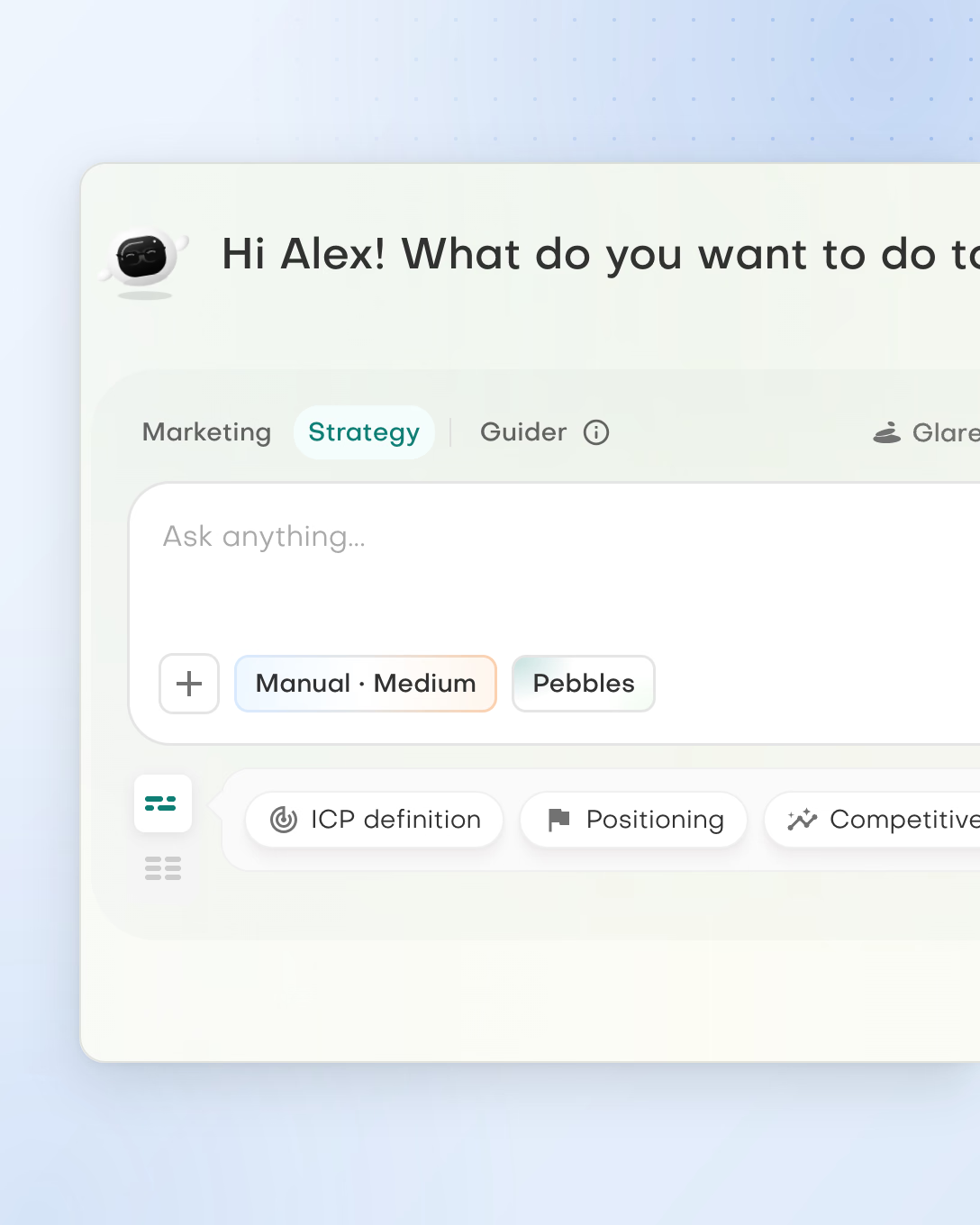
New chat in Pebbles Ai with the Strategy assistant selected, the composer in Manual mode at Medium effort and quick starts for ICP definition, positioning and competitive landscape.New chat with the Strategy assistant selected, the composer in Manual mode at Medium effort and quick starts for ICP definition and positioning.

How Pebbles Ai solves it

Cut SaaS and AI sprawl

  1. AI workspaceone platform for research, leads, outreach, email and social
  2. Plans and poolsshared AI credit and lead pools (Team and above)
  3. Plans and poolsfree observer seats
  4. IntegrationsMCP: keep only the tools you still need connected
  5. Team Productivity boardvalue per seat
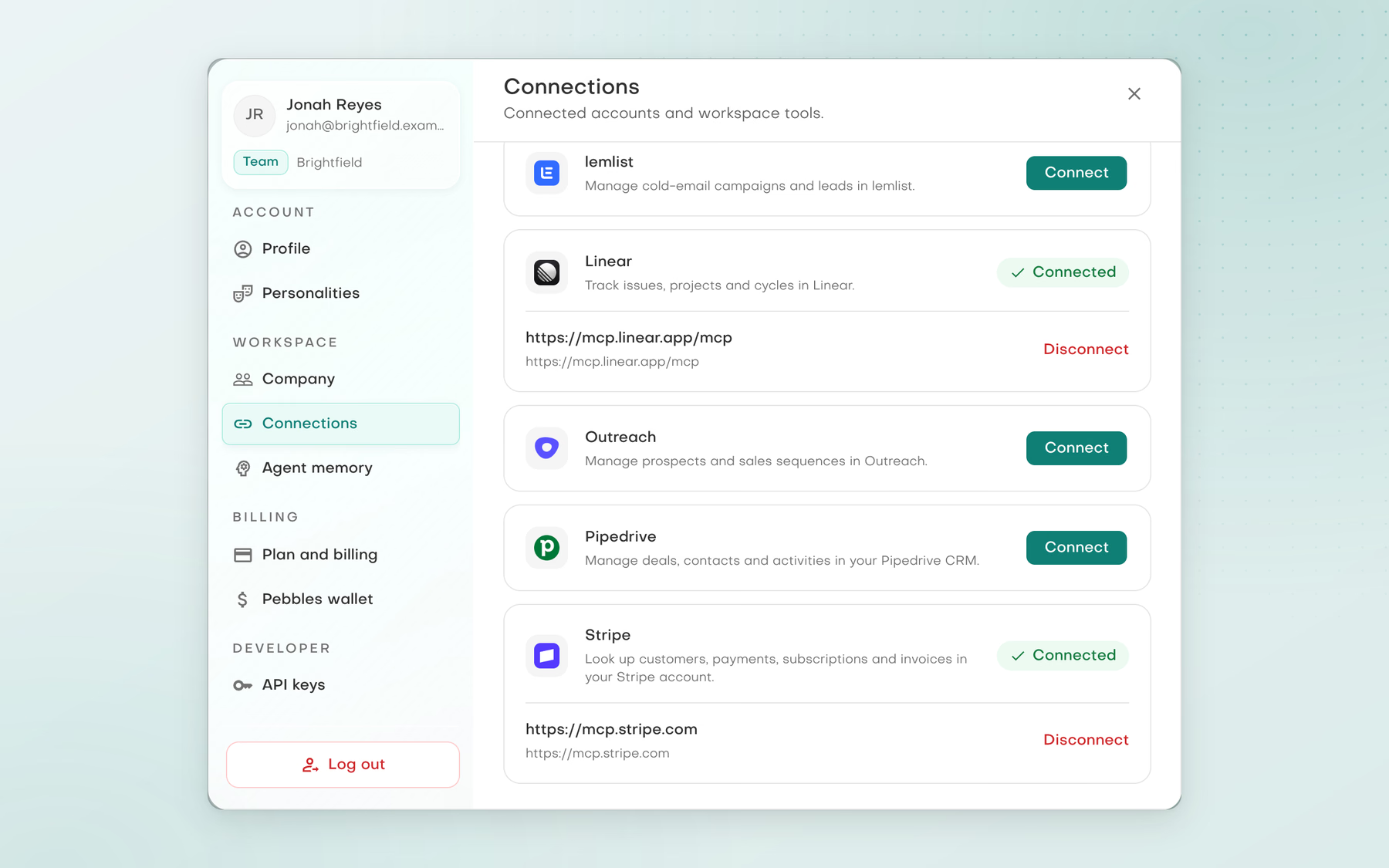
Settings, Connections, MCP servers: lemlist, Outreach and Pipedrive with Connect buttons, and Linear and Stripe marked Connected with their server addresses.

MCP servers

Connect servers from the catalogue in Settings. Linear and Stripe are connected here; the catalogue may change.

How Pebbles Ai solves it

Run more channels with the same team

  1. Company IntelBrand voice
  2. Marketing AssistantOutreach: a first message to each recipient you pick from the CRM
  3. Marketing Assistanta scheduled task: follow-up emails at the times you set
  4. Social publishingpublish or schedule posts on LinkedIn, X, Instagram and more
  5. Libraryreview once, reuse many times
Company Intel's Company checklist, every section ticked and Problem Statement(s) selected, beside the editor for 'Launch-week replies pile up' and the collapsed statements 'Every rep sounds different' and 'Follow-ups slip after the launch'.Three AI-suggested rewrites of a Brightfield problem statement, under a header showing Elena Morris last updated the Company Intel profile at 11:20 on 13 Oct 2026.

Social publishing

Publish or schedule posts across your social accounts

Learn more

Problems it helps solve

    • No data to prove marketing worksHead of Marketing / Growth, solved with “Show what the work delivered”
    • Proving ROI with patchy dataHead of Marketing / Growth, solved with “Show what the work delivered”
    • Teams shrinking while resources run shortHead of Marketing / Growth, solved with “Run more channels with the same team”
    • More channels to run, same small teamHead of Marketing / Growth, solved with “Run more channels with the same team”

How Pebbles Ai solves it

Show what the work delivered

  1. Strategy Assistantagree the value story and the measures with leadership
  2. Social publishingpost performance reports
  3. CRMsegments and deals tied to each campaign, in saved views
  4. Strategy Assistant/create-assets: a board-ready spreadsheet and slide deck
  5. Librarythe record of approved work that shipped
New chat in Pebbles Ai with the Strategy assistant selected, the composer in Manual mode at Medium effort and quick starts for ICP definition, positioning and competitive landscape.

Strategy assistant

Start a strategy task in a new chat, set the execution mode and effort in the composer, or type / to pick a focused skill such as Research or Strategise.

How Pebbles Ai solves it

Run more channels with the same team

  1. Company IntelBrand voice
  2. Marketing AssistantOutreach: a first message to each recipient you pick from the CRM
  3. Marketing Assistanta scheduled task: follow-up emails at the times you set
  4. Social publishingpublish or schedule posts on LinkedIn, X, Instagram and more
  5. Libraryreview once, reuse many times
Company Intel's Company checklist, every section ticked and Problem Statement(s) selected, beside the editor for 'Launch-week replies pile up' and the collapsed statements 'Every rep sounds different' and 'Follow-ups slip after the launch'.Three AI-suggested rewrites of a Brightfield problem statement, under a header showing Elena Morris last updated the Company Intel profile at 11:20 on 13 Oct 2026.

Library review

Review, comment and approve before work is reused

Learn more

Problems it helps solve

    • No data to prove marketing worksHead of Marketing / Growth, solved with “Show what the work delivered”
    • AI fatigue on top of the day jobHead of Marketing / Growth, solved with “Do more with the team you have”
    • Proving ROI with patchy dataHead of Marketing / Growth, solved with “Show what the work delivered”
    • Teams shrinking while resources run shortHead of Marketing / Growth, solved with “Run more channels with the same team”

How Pebbles Ai solves it

Show what the work delivered

  1. Strategy Assistantagree the value story and the measures with leadership
  2. Social publishingpost performance reports
  3. CRMsegments and deals tied to each campaign, in saved views
  4. Strategy Assistant/create-assets: a board-ready spreadsheet and slide deck
  5. Librarythe record of approved work that shipped
New chat in Pebbles Ai with the Strategy assistant selected, the composer in Manual mode at Medium effort and quick starts for ICP definition, positioning and competitive landscape.

Strategy assistant

Start a strategy task in a new chat, set the execution mode and effort in the composer, or type / to pick a focused skill such as Research or Strategise.

How Pebbles Ai solves it

Do more with the team you have

  1. Company Intelbrief once: Business knowledge and Brand voice
  2. AI workspaceMarketing and Strategy assistants with pinned skills (Research, Strategise, Write now) inside a project
  3. Execution modesPlan or Auto for reviewed routine work; approval cards for anything that leaves the workspace
  4. Libraryreuse approved work instead of rewriting it
  5. Team Productivity boardsee speed, quality and contribution
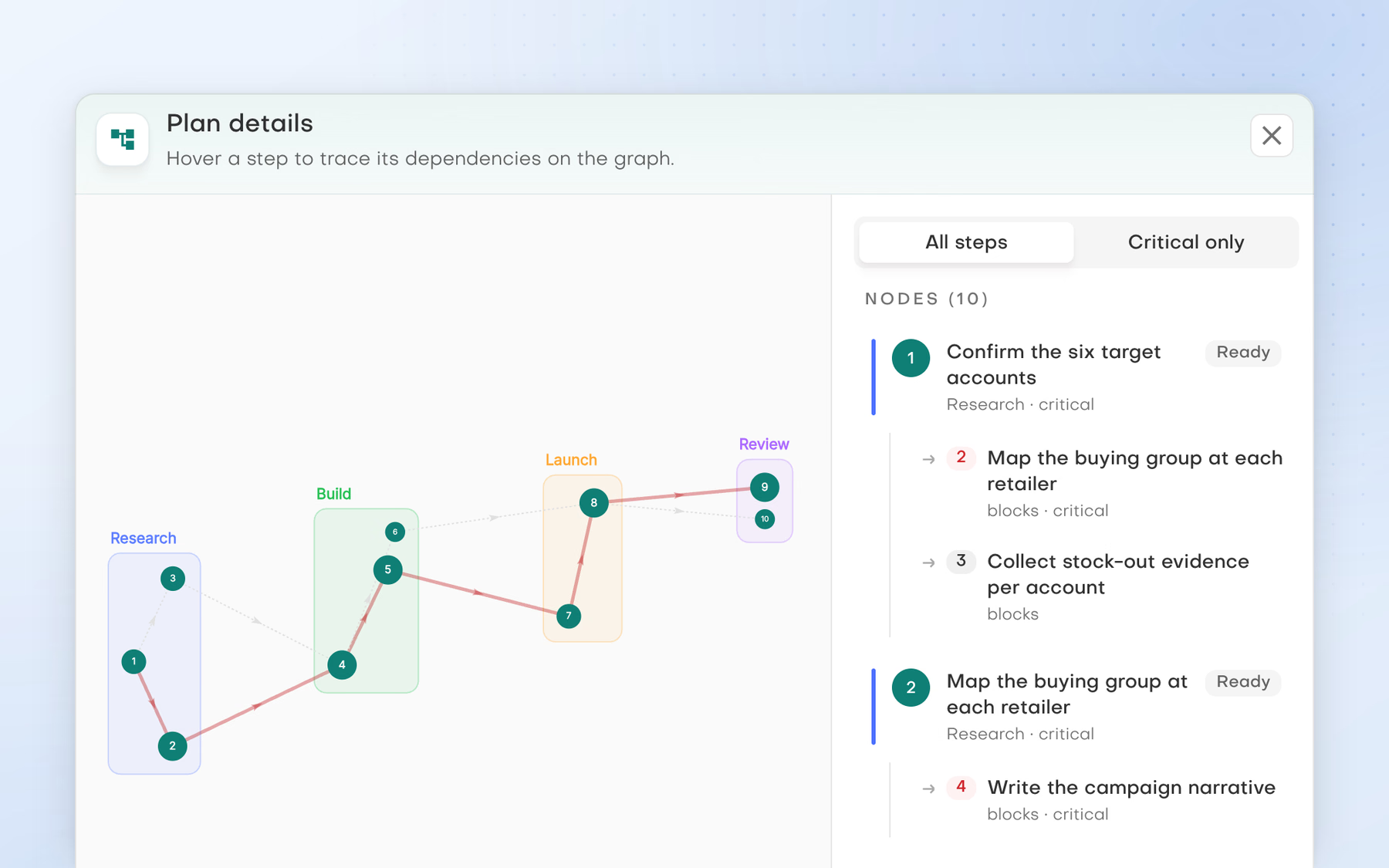
Plan details with the plan's steps drawn as a dependency graph across Research, Build, Launch and Review, beside the list of steps with their status.

Inspect the plan

Inspect the steps and dependencies in a plan, then decide how to proceed before the assistant carries on.

How Pebbles Ai solves it

Run more channels with the same team

  1. Company IntelBrand voice
  2. Marketing AssistantOutreach: a first message to each recipient you pick from the CRM
  3. Marketing Assistanta scheduled task: follow-up emails at the times you set
  4. Social publishingpublish or schedule posts on LinkedIn, X, Instagram and more
  5. Libraryreview once, reuse many times
Company Intel's Company checklist, every section ticked and Problem Statement(s) selected, beside the editor for 'Launch-week replies pile up' and the collapsed statements 'Every rep sounds different' and 'Follow-ups slip after the launch'.Three AI-suggested rewrites of a Brightfield problem statement, under a header showing Elena Morris last updated the Company Intel profile at 11:20 on 13 Oct 2026.

Next week, run it on Pebbles Ai

Working on your own?

Start on Pro

The plan for one person. 1-month free trial, no card needed.

Running a team?

Choose Team

Adds shared review, comments and the Approved Library.

Not sure yet?

Talk it through

Bring a real challenge from your week and see where Pebbles Ai fits.