
Pebbles Ai for Leadership
Your leadership week,
with GTM firepower
Make GTM decisions from cited evidence, keep one version of the company and approve every action before it runs.
1-month free trial. No card needed on Pro.

Pick a role
Whose week are we looking at?
NovemberNov 2026
12:00Mon 9
Tue 10
Wed 11
Thu 12
Fri 13




- CASA II
- Microsoft 365
- GDPR
- SOC 2 Type II Pending
Monday, 09:00
Build and inspect a cross-functional plan before execution
Starts when A pilot, launch or operational initiative needs dependencies, handoffs and a clear sequence.
With Pebbles Ai
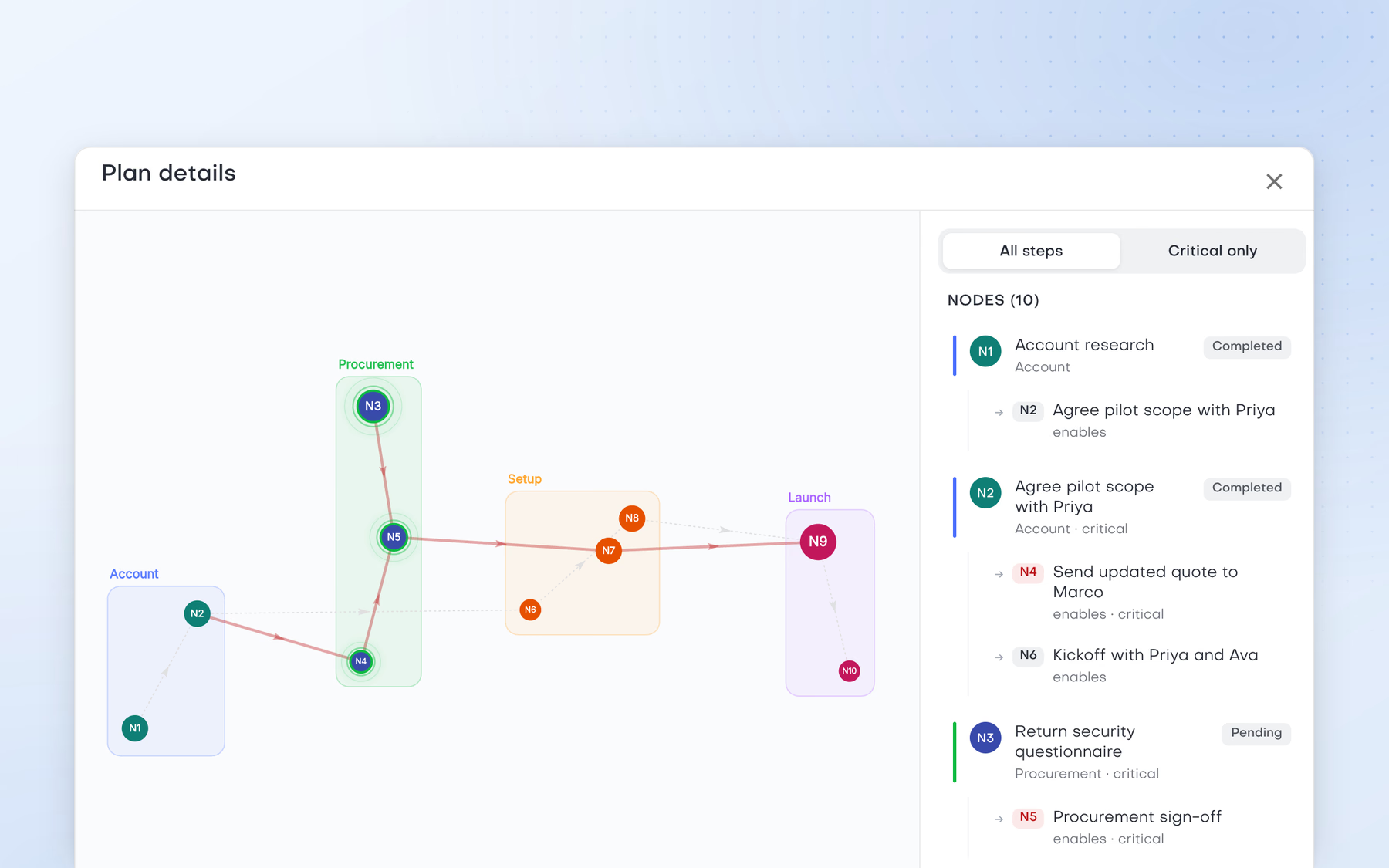
- Describe the goal to the Strategy assistant.
- Inspect the steps and dependencies of the plan.
- Choose Manual, Plan or Auto for actions that reach outside the workspace. Template sends and calendar deletions always ask for approval.
Outcome
A plan you can inspect before execution, with clear control over which actions need approval.
Without Pebbles Ai
- Turn the goal into tasks in a project tool.The plan sits apart from execution.
- Chase dependencies across Slack and Notion.Dependencies surface late.
- Decide by hand which actions need approval.Teams can act before dependencies are clear.
Where it hurts
The plan and the execution controls are separate, and teams can act before the dependencies are understood.
Tuesday, 11:00
Turn research into a launch plan
Starts when The research is done and the marketer needs a sequence of decisions and actions for a launch.
With Pebbles Ai
- Keep the work in an AI workspace project.
- Shape the plan with the Strategy assistant and inspect its steps and dependencies.
- Keep lasting project facts in Project memory.
- Choose Manual, Plan or Auto for actions that reach outside the workspace.
Outcome
A launch plan connected to the research and project context, with the execution controls visible before anything runs.
Without Pebbles Ai
- Move the research into a planning doc or project tool.Evidence and plan become separate artefacts.
- Create a task list.Tasks lose the reasoning behind them.
- Brief an AI separately on the same context.The same briefing, again.
- Update the plan as assumptions change.Every change means another round of briefing.
Where it hurts
Evidence, decisions and execution steps become separate artefacts and need repeated briefing.
Wednesday, 14:00
Keep a multi-week initiative in one operator workspace
Starts when The COO or ops lead is running a launch, a customer pilot or a GTM initiative across several weeks.
With Pebbles Ai
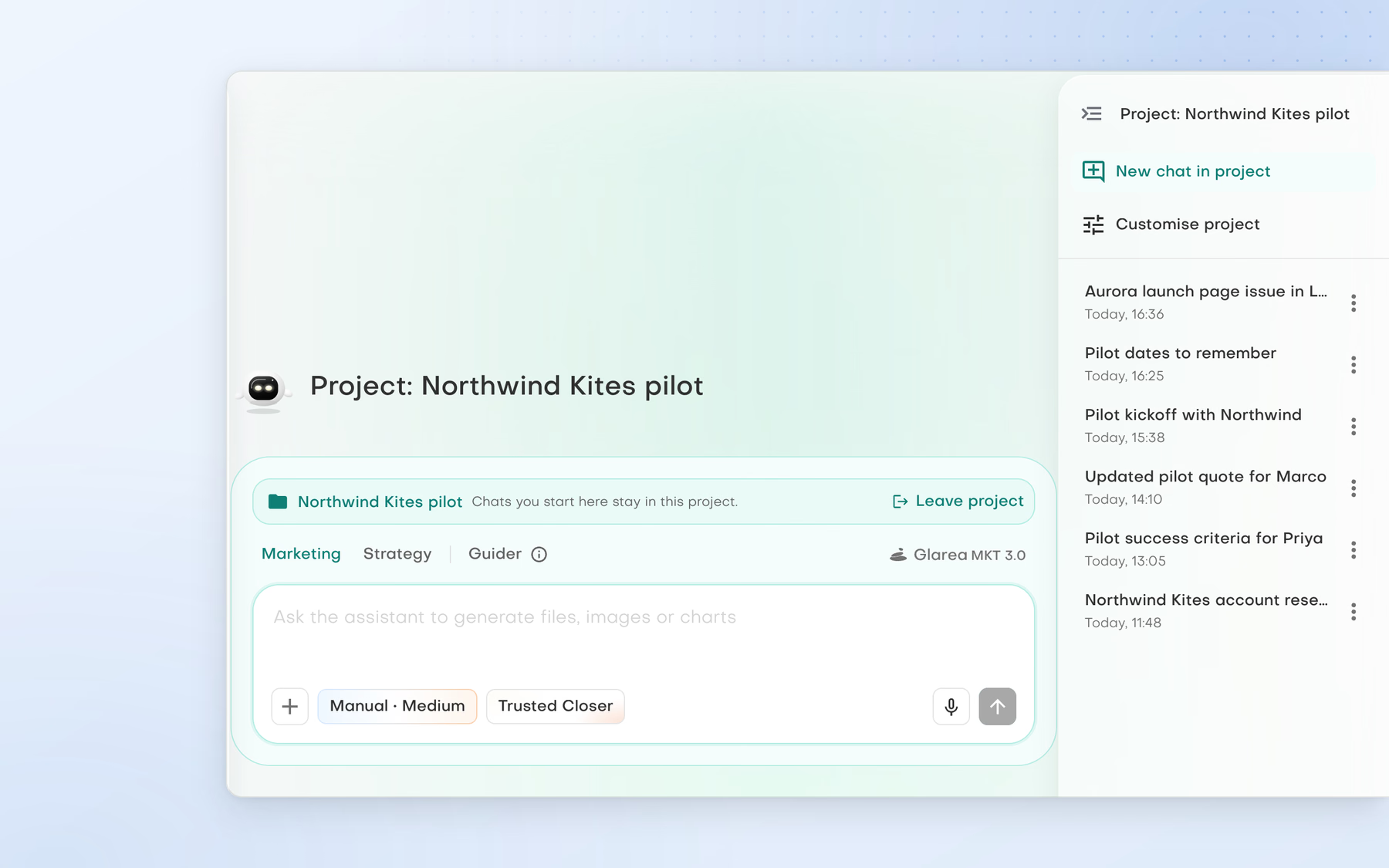
- Create a project in the AI workspace.
- Use the Strategy and Marketing assistants and the Guider in related chats.
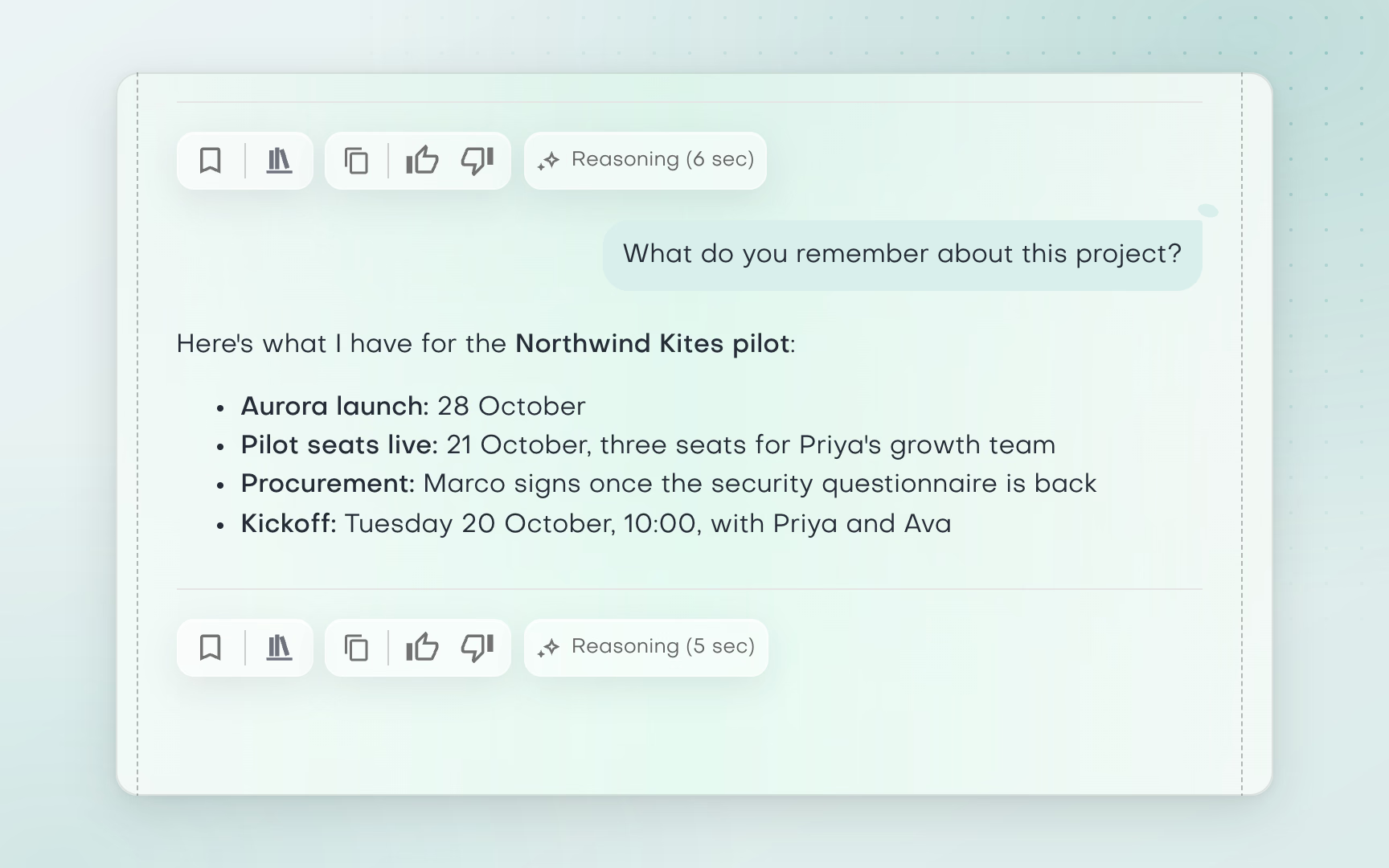
- Keep lasting initiative facts in Project memory, so new chats in that project start from the same remembered facts.
Outcome
Less repeated briefing for the operator and a more continuous record of the initiative's AI-assisted work.
Without Pebbles Ai
- Open separate AI chats for strategy, content and support.Context is split across chats.
- Restate goals, dates and decisions in each one.Time goes on re-briefing the AI.
- Piece the initiative's history back together.No continuous record of the work.
Where it hurts
Context gets lost between chats and the operator spends time re-briefing the AI.
Thursday, 10:00
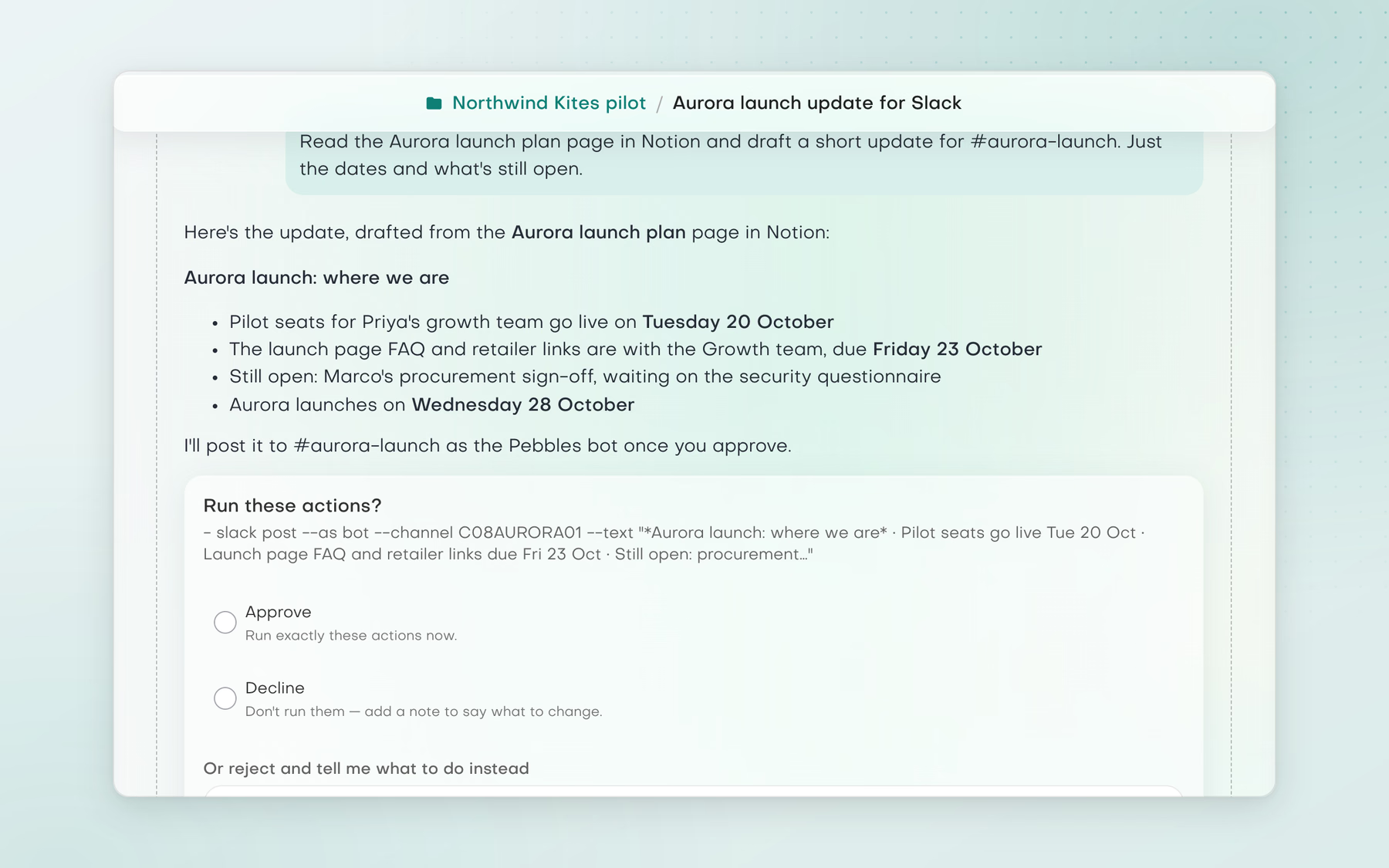
Turn a source page into a stakeholder update
Starts when A weekly launch or status update needs to go to the team from an existing Notion source of truth.
With Pebbles Ai
- Connect approved Notion pages and Slack.
- Ask the Marketing or Strategy assistant to read the shared page and draft a short update.
- Review it, and in Manual mode approve the Slack post before it runs.
Outcome
A faster stakeholder update that still starts from the source page and stays under human review.
Without Pebbles Ai
- Read the source page and decide what changed.Spotting changes by hand, every week.
- Rewrite it for Slack.The update can drift from the source.
- Paste it into the channel.Copy and paste between tools.
- Repeat next week.Routine work that never gets shorter.
Where it hurts
Status updates are repetitive and can drift from the source document.
Friday, 15:00
Move work between Notion, Slack and operational systems with approval
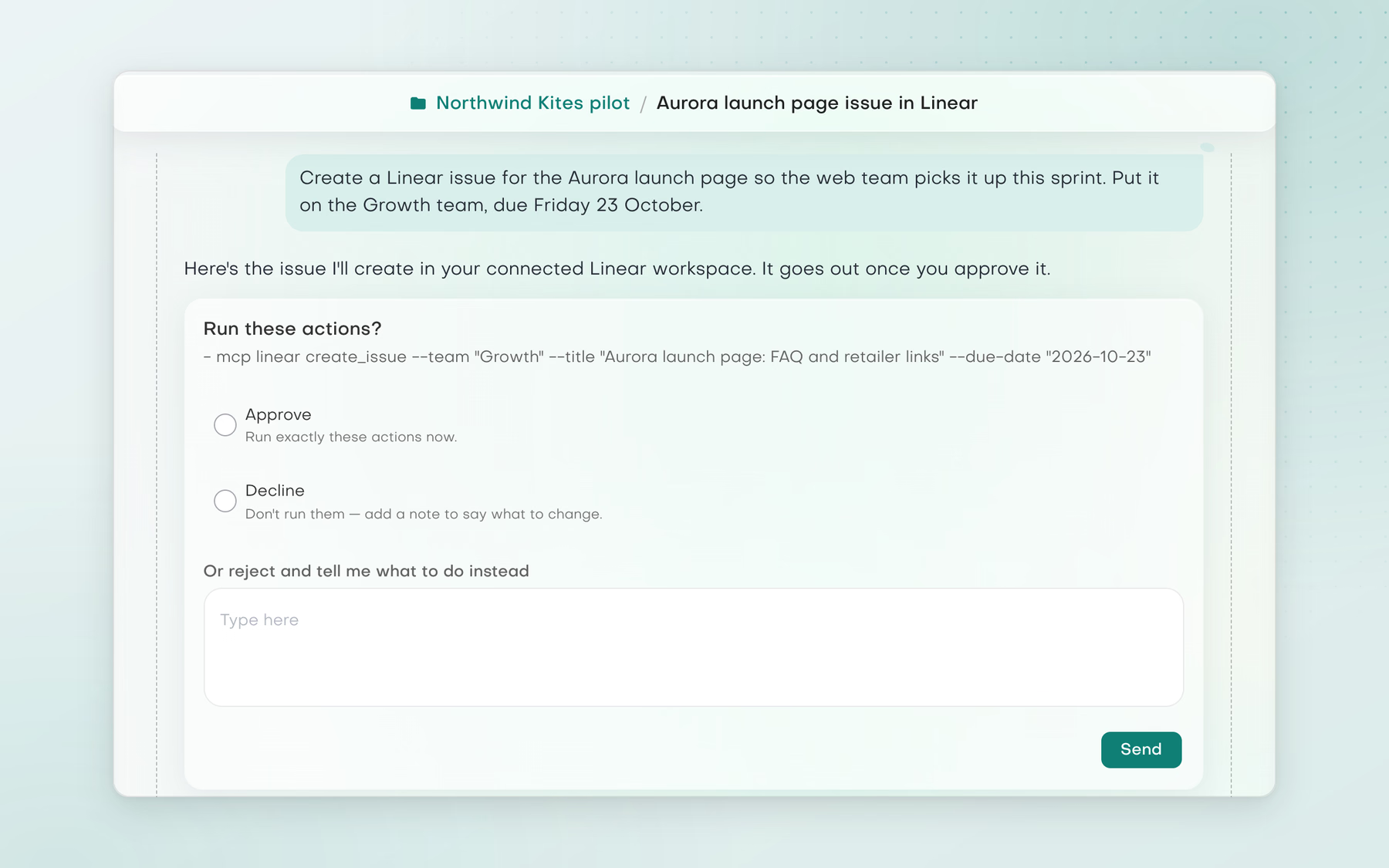
Starts when A task starts in one system and needs an update or action in another, such as turning a Notion plan into a Slack message or opening an issue in Linear.
With Pebbles Ai
- Connect Notion, Slack, your calendar and supported MCP servers.
- Ask the assistant to read the connected source and prepare the downstream action.
- In Manual mode, inspect the exact action on the approval card before it runs.
Outcome
Fewer copy-paste handoffs, with the operator still in control of external actions.
Without Pebbles Ai
- Copy information between tabs.Details get lost in the copy.
- Rewrite the update for the next tool.Routine work, every time.
- Create the downstream task by hand.Handoffs depend on someone remembering.
- Return to the source tool to keep records in sync.Records drift out of step.
Where it hurts
Routine handoffs cost time and create chances for details to be lost.

Works with your stack
Starts where your team already works
- Notion
Assistants read approved Notion pages as the source for plans and updates.
- Slack
Assistants draft updates and post them after you approve, in Manual mode.
- Linear
Through supported MCP servers, assistants prepare issues for you to approve.
- Google Calendar
Assistants find a slot and add the meeting once you approve it.
- Gmail
Drafts land in your own Gmail, and Smartbox writes replies from the thread for you to review.
- Outlook
The same for Outlook: drafts in your mailbox and replies written from the thread.
 Notion
 Slack
 Linear
 Google Calendar
 Gmail
 Outlook
Assistants read approved Notion pages as the source for plans and updates.
Tap a tool to see how it connects. More through supported MCP servers.
Explore all integrations

Compliance without cross-training
“It meets our finance compliance needs with secure partitioning and no cross-training.”


Visibility we never had
“Pebbles Ai gave us visibility we never had.”


Every contribution, in view
“It gives us a clear view of how each person and team is contributing.”


Strategy and execution in one
“These assistants give my team and me what no generic AI can: real strategic clarity and practical execution.”


Pilots with multinationals
“With Pebbles Ai, we secured pilot programmes with several multinationals.”


Every team finally aligned
“Pebbles Ai removed the usual chaos from our team workflows.”


No more second-guessing emails
“I didn’t realise how much time we were wasting until we switched to Pebbles Ai.”


The output of a bigger team
“One marketer and SDR delivers the output of three.”


Precise, relevant, persuasive
“Hands down the most comprehensive, science-backed outbound engine I’ve seen.”
Clear answers
Questions about Pebbles Ai for COO / Operations
How can a COO use AI across go-to-market operations?
Use it to plan cross-functional work, keep long initiatives in one place and move approved actions between tools. The Strategy assistant lays out steps and dependencies, a project holds the chats and Project memory, and connected tools such as Notion, Slack and supported MCP servers take the next action under the mode you choose.
Can AI turn a strategy into an execution plan?
Yes, as a plan you can inspect. Describe the goal to the Strategy assistant, check the steps and dependencies, and ask for a document, spreadsheet or slide deck if the team needs one. An assistant can then prepare the downstream action, such as a Slack message or a Linear issue, for your approval in Manual mode.
Can I see a plan before anything runs?
Yes. The Strategy assistant lays out the steps and dependencies of the plan for you to inspect, and you choose Manual, Plan or Auto for actions that reach outside the workspace.
What is the difference between AI planning and taking actions?
Planning lays out the work; taking an action changes something outside the workspace, such as sending an email, posting to Slack, writing to the CRM or changing a calendar. In Plan mode those actions are queued, not run. In Manual each waits for approval. In Auto they run without asking, except template sends and calendar deletions.
Which actions always ask for approval?
Template sends and calendar deletions always ask for approval. In Manual mode every external action waits on an approval card that shows exactly what will run.
Which tools can Pebbles Ai work across?
Notion, Slack, your calendar and supported MCP servers such as Linear, once you connect them. The assistant reads the connected source and prepares the downstream action for you to approve.
Keep exploring
More solutions
Leadership
Founder / CEO
GTM decisions from evidence, not a blank chat
See how it works for Founder / CEOSales
Sales teams
Find the right accounts and keep every deal moving
See solutions for sales teamsMarketing
Marketing teams
Keep every campaign on brand, from research to launch
See solutions for marketing teams
Next week, run it on Pebbles Ai
Working on your own?
Start on Pro
The plan for one person. 1-month free trial, no card needed.
Not sure yet?
Talk it through
Bring a real challenge from your week and see where Pebbles Ai fits.